Description
Divido brings your personal budget and shared expenses with friends together in one app. Log spending in seconds, and let Divido turn shared bills into clear, simple debts.
VOICE AND RECEIPTS
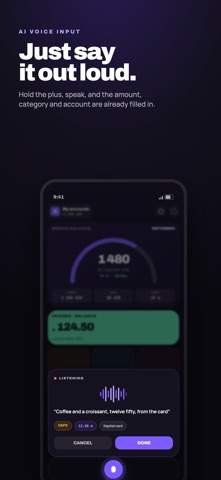
• Say "coffee five dollars yesterday, cash" — Divido fills in the amount, date, account and category.
• Snap a receipt — the total and line items appear. Your phone reads the receipt itself; the photo never leaves it.
• With a Shortcuts automation, every card payment from Wallet offers to log the expense for you.
PERSONAL FINANCE
• Accounts: cards, cash, savings and debts, with a combined balance.
• 64 currencies with daily exchange rates.
• A monthly budget plan: income, expenses, category groups and a month-end forecast.
• Savings goals with a "what if I save more" preview.
• Recurring payments — subscriptions, rent, loans — are logged automatically.
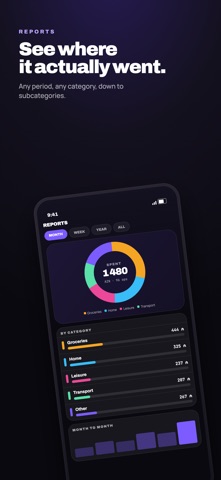
• Reports by category and month, CSV export.
• Home Screen widget.
SHARED EXPENSES
• Groups for a trip, a flat or friends — plus one-on-one expenses.
• Split equally, by shares, by exact amounts or by receipt items.
• Different currencies in one group.
• "Simplify debts" — the fewest payments to settle everyone up.
• Invite with a link or QR code. Add people without the app as guests.
• Notifications about new expenses and settle-ups.
YOUR DATA STAYS YOURS
No ads, no third-party trackers. Sign in with Apple or email, sync across devices, and delete your account right in Settings.
DIVIDO PRO
Everything above is free. Without a subscription you get 5 voice entries and 3 receipt scans every month. Divido Pro removes the limit — monthly or yearly. The subscription renews automatically; cancel any time in your Apple ID settings at least 24 hours before the end of the period.
Terms of Use: https://www.apple.com/legal/internet-services/itunes/dev/stdeula/
Privacy Policy: https://divido.ru/legal/privacy/en/
What's new (v1.0.3)
Filters for transactions
• The All transactions screen now has filters: period, income or expense, account, amount on a slider, categories with subcategories, and words from the note. What you picked shows up as chips, and the cross removes any of them.
• From a report you can now go to the transactions: an expanded category shows its subcategories and an "All transactions" row, with the period taken from the report.
• A category in a report expands when you tap anywhere in its row, and subcategory totals are shown in your main currency.
Your own order of categories
• Categories and subcategories are rearranged by touch and hold: the card lifts and follows your finger, and near the edge the list scrolls by itself.
• The order is saved, travels to your other devices, and is the order categories come in when you log an expense.
Fixed
• A transfer between accounts only went halfway: money left one account and never arrived at the other. The destination account is now saved, and with different currencies so is the amount that arrives, at the current rate.
• Account balance is worked out from the opening balance and the transactions, and correcting it is recorded as a separate "Balance adjustment" instead of rewriting the past.
• The amount keypad is in phone order everywhere: 1-2-3 on top.
• The category list in settings scrolls again, and a row you drag no longer pulls the sheet along with it.
• The emoji keyboard for a category label opens only when you tap it.
• The figures in the middle of the ring on the main screen no longer shift about when you pick a category.