Description
bTime records the hours you work and turns them into a document you can hand to whoever pays you.
It is built for one person: you. No account, no company dashboard, nobody watching where you are. Your hours live on your phone and go nowhere unless you send them yourself.
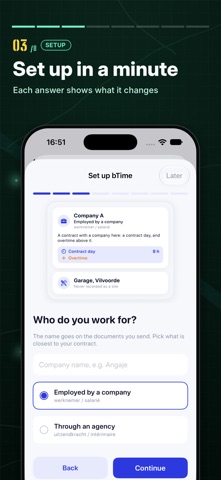
SET UP IN A MINUTE
A short guide asks who you work for, when your day starts and who gets your hours. Each answer shows, in a small live picture, what it changes.
STARTS THE DAY WITH YOU
Set the time you normally start and bTime opens the day for you, on the Lock Screen and in the Dynamic Island. The site is filled in when you get there.
THE JOB AND ITS ADDRESS
Give the job a name — "Team A", "Renovation Dilbeek" — and its address. Type the name again tomorrow and the address comes with it. If what was typed can't be found on the map, bTime asks for the real address.
CLOSES THE DAY IF YOU FORGET
After ten hours worked, the day closes itself, with a reminder a quarter of an hour before. Forgot to stop? The next time you open bTime it asks when you really finished, and only those hours are kept.
LUNCH AT ITS TIME
The break comes off only a day that ran through lunch. One tap changes it.
EVERY DAY AT A GLANCE
Each day is a card: the hours in a circle, the job and its address, and a line across the day — work, lunch and overtime, each in its own colour.
OVERTIME, THE BELGIAN WAY
Set your contract day once. Above 8 hours a day or 40 a week is overtime; Sundays and public holidays count at +100%.
THE DOCUMENT AT THE END
A clean PDF and a spreadsheet from the same hours, each day with its start, end and lunch. Paid twice a month? Send each half; the whole month shows both halves and which one has already gone. Your app is in Ukrainian and your boss reads Romanian? The documents go out in his language.
YOUR PAY STAYS YOUR BUSINESS
Your hourly rate stays hidden until you tap the eye, can sit behind Face ID, and never goes into a document unless you choose so.
ALSO
· Two companies on one phone, each counted its own way
· Travel by the kilometre, if your company pays it
· Belgian public holidays mark themselves; days off and sick days
· A week planned ahead, each day with its own hours
· The month on a map, the year at a glance
· Backup as a file you keep
· English, Français, Nederlands, Română, Українська
NO ACCOUNT. NO SERVERS. NO ADVERTISING. NO TRACKING.
Your hours are logged even in flight mode; only finding an address asks Apple Maps. Nothing about your work is uploaded, sold or shared.
What's new (v1.1.1)
A fix, and a heads-up for new versions.
· Fixed: answering a bTime notification ("Still working", "Finished") without opening the app could make bTime crash in the background. Your answers were always saved.
· When a new version of bTime is in the App Store, the app now tells you once and shows "Update available" at the top of Settings.